CMMS — for the teams who run the building
Every work order in one system.
Requests, preventive maintenance, vendors, and equipment history — across all your buildings. Online or off.
01 Anyone reports it
Report a problem
Whitman Elementary · Boiler room
No heat in the gym this morning.
02 The tech closes it
Boiler 2 — no ignition
Whitman Elementary · Boiler room
“No heat in the gym this morning.”

03 The office sees it live
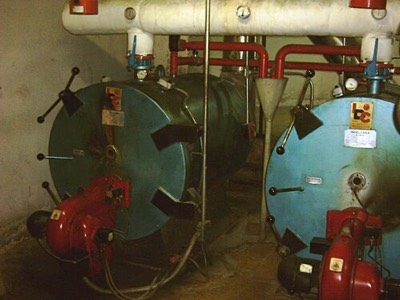
Photo: “Calderas 1” by Yrithinnd, via Wikimedia Commons, CC BY 2.5 — cropped.
The old way
Paper work orders vanish. Bricks closes them.
You still know every building by heart. The difference is what happens to the request you couldn’t get to today.
Where work orders go today
- A sticky note on the boiler.
- A 6 a.m. text to the on-call tech.
- The shared inbox nobody owns.
- A whiteboard in the shop.
- The spreadsheet one person keeps.
- “Any word yet?” — for the third time.
Where they go on Bricks
- Scanned, numbered, and logged the moment it’s reported.
- Triaged and assigned to a person or a vendor.
- Closed out from a phone, photos attached.
- On the asset’s history the second it’s done.
- The requester texted automatically. No chasing.
- One queue, every site — the whole loop in view.
How the work moves
Everything between “it’s broken” and “it’s fixed.”
One loop, in the order the work actually happens.
- 01
The request
It comes in from anywhere.
Someone scans the QR code on the unit, or opens a request link — no app, no login. It lands in the queue with a photo.
Result Nothing dies on a sticky note.
- 02
Within minutes
It’s triaged and assigned.
Set a priority and assign it to a tech or vendor. PM schedules drop tasks into the queue before things break — on a calendar, a meter reading, or equipment condition.
Result Each job gets an owner and a due date.
- 03
Out in the field
The tech closes it out on the spot.
Your crew works from their phones, connection or no connection. Photos, notes, and checklists sync on their own once the phone finds signal.
Result The work is recorded where it happens — not retyped later.
- 04
After the fix
The history stays on the equipment.
Work orders log to the equipment — parts, hours, photos. Scan any unit’s QR for its full history. Parts come off inventory as used.
Result Repair-or-replace stops being a guess.
- 05
At month end
The numbers add up.
See what breaks, what it costs, and where the hours go: MTTR, MTBF, PM compliance, cost by asset. One site or all of them.
Result When budget season comes, the numbers are already there.
Where the others stall
The signal drops. The work doesn’t.
Most CMMS apps need a connection to do anything at all. Bricks keeps working and catches up when the signal returns.
Works where your crew works. Boiler rooms, metal buildings, secured sites with no Wi-Fi and no bars.
Everything saves to the phone. Photos, notes, checklists, closeouts — all of it, offline.
Syncs itself when signal returns. Nobody presses a thing, and nothing gets typed twice.
“Offline has been the biggest stumbling block for the other companies.”
Boiler 2 — no ignition
Whitman Elementary · Boiler room
Getting started
Start with your old system, a binder of PMs — or just your buildings.
No rip-and-replace to begin. We take whatever you have and turn it into a running system.
-
We load what you have.
An export from your old CMMS, a spreadsheet of assets, a binder of PM schedules, or just your building list. Anything is a starting point.
-
We build your location tree.
Campuses, buildings, floors, and rooms in one hierarchy, with a QR code ready to print for each unit.
-
Your crew takes it from there.
They’re scanning codes and closing work orders from their phones within weeks.
Your buildings, your data. Export everything, any time.
What’s included
What a multi-site team runs on.
One system, one price. It’s all included.
Requests & work orders
- Work request portal — unlimited requesters, no seats
- QR scan-to-request
- Request-to-work-order routing
- Priorities & assignments
- Checklists & photos
- Work-order & PM templates
- Close-out from any phone
Preventive maintenance
- Calendar, meter & condition triggers
- Automatic PM scheduling
- PMs in the same queue
- Recurring inspections
Assets & inventory
- Asset registry & hierarchy
- Full maintenance history
- QR code on every unit
- Warranty dates
- Parts & spare-parts inventory
- Low-stock alerts
- Purchase orders
Scale & the office
- Multi-site location tree
- Vendor management
- Instant email & text updates
- Analytics — MTTR, MTBF, PM compliance
- Cost by asset
- Downtime tracking
- AI chat sidebar — any work order, any asset
- Open REST API
- Works offline
The platform
Maintenance is one of three Bricks products.
The same boiler you fix today shows up in the five-year plan and on the books.
FAQ
Common questions.
-
Do you have a mobile app — and does it really work offline?
Yes. Photos, notes, and closeouts save on the phone with no signal, then sync on their own when you’re back in range.
-
Can people report a problem without an account?
Yes. Anyone who can point a camera at the QR sticker can report a problem. Only people doing the work need a seat.
-
Will my crew actually use it?
Built for a phone in a gloved hand: scan a code, see the job, check off the work, close it out. Even with no signal.
-
Can outside vendors get work orders?
Yes. Send a job to a vendor. Their updates, notes, and status land on the same work order your team sees.
-
Can we start from our old system?
Yes. An export, a spreadsheet, or a binder is plenty to start from.
-
How much does it cost?
$600 per user per year. You pay for the people who do the work — not the ones who only report problems by QR.
Watch one work order go from a QR scan to closed — on your phone.
We’ll take one job end to end: reported by QR, fixed and closed from the field.